
Todoist & PARA - Effortless Personal Task Management | Setup and Routines
How I use a few minutes each day + ~30 minutes each week to make sure nothing falls through the cracks
Two or three weeks ago, I rebuilt my tasking setup. I had let it break and decided to be ok with that.
I chose to be comfortable with the broken state of things and simply observe the consequences. With that knowledge, I could rebuild my system with only what is valuable.
Being among the second brain community helped motivate me but what really hit me was this note:
What it feels like to be disorganized
There is always a low level background anxiety that there is something important undone
Chaos, lost, frazzled, overwhelming, messy, reactive. It feels normal until you experience the clarity that organization offers.
Without ever experiencing organization, a scatter brained, stressed, and tired state is just normal and a consequence of working.
It was all true.
My daily routines were going well, but I felt like tasks and projects were starting to pile up. It felt like a thousand things were in progress and most weren't moving meaningfully forward.In the time since I’ve rebuilt my tasking system, I feel that my motivation is up. I feel less burdened and less scattered. I’m back to making progress on projects that aren’t business related.
I’ve also given myself a way to make incremental progress on low priority passion projects when the inspiration hits me. Sometimes this is just jotting down an idea or adding some possible next steps for future-me to resurface.
Ultimately, what I’ve learned is:
When life is organised and priorities are clear, what emerges from the clutter, is you.
Before we dive in, here are guiding principals from my original Todoist setup post):
- - Because the goal is productivity but also flow, and because we aren't always at our best, we need to build systems that don't break easily; otherwise, the need to be perfect will also stress us out, subtly causing us to start resenting our systems.
Invisible work is the enemy of our inner peace and flow. Work items we hold in our heads and don’t write tend like to wait until we’re engaged in some other activity before assaulting the backs of our brains. In extreme cases, this feels like a whirlwind in our minds and harms our ability to focus and stay present.
Because of this, we need to commit to capturing every to-do. In order to keep that commitment, we need to be mindful of our internal resistance which tends to flare if we don’t have:
Easy and predetermined ways to capture these items- a system to manage (or process) items easily after capturing them- certainty that they will surface at the right time
With the setup below, I've gone as many as 3 weeks only capturing tasks but not processing or actioning anything. When I finally came back to it, the consequence was about 10 extra minutes of processing what was my inbox. This allows me to step back without stress.
Alright, let’s look my iterated workflow
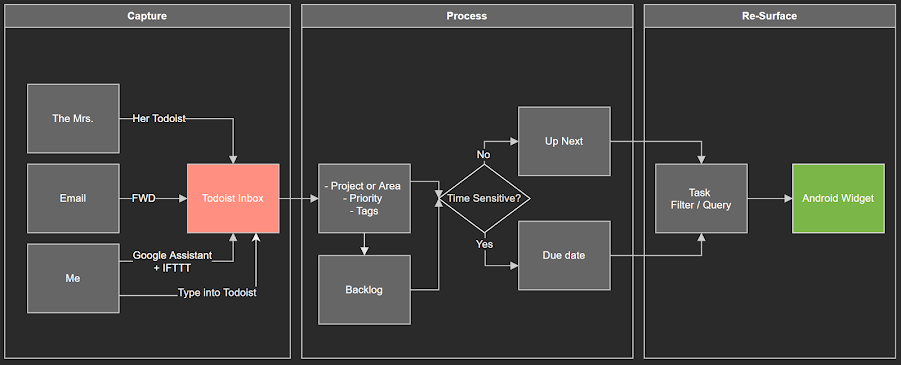
There are 3 key areas of focus: Capturing, processing, and Resurfacing
While the diagram below looks complicated, here is the essence:
- - Capture tasks so they end up in (ideally) one inbox- Process the tasks so they will re-surface in context or at the right time- Set up a the mechanism so that tasks resurface
I describe how the system helps me achieve all of these in the video above. I also show what this workflow looks like in Todoist
Minimal Habits
Right now, I do daily, weekly and 3-6 monthly reviews.
Daily Habits
On a daily (or at worst every 2 daily) basis, I:
- Process my inbox as per the chart above.- Make sure it will show up at the right time or in the right context by adding it to a project or area, tagging it, giving priority and adding a date if needed.
Weekly Habits
Once per (roughly) week, I:
- Look to see if any tasks in my @Up_Next have become irrelevant or less important- Arrange projects and areas in order or priority- Look through my top priority projects for tasks I want to work on this week and tag them as @Up_Next or give them a due date. Sometimes I add tags, change priority level, or change the wording of the task name.- Create tasks to fix any system issues I feel I’m experiencing
2-4x / Yearly Habits
2-4 Times per year, I also:
- Review my life goals, areas, and projects to make sure that they are all relevant and well aligned (for more on this process, [see here))- Read over my values and principals to re-connect and see if I want to make updates
That's it. Pretty lightweight stuff, right?
Using Todoist Filters to Power Your Workflow
Next, here's how my '🏄🏼♂️ Tasks' page works.
The ‘🏄🏼♂️ Tasks’ page is a filter powered by the query below which you can copy / paste into your setup.
If you use the same tags as I do it should work out of the box.
If not, you can change the names below and it should work for yours. the query so you can make your own:
Overdue, Today, @In_Progress & !due before:today & !@Blocked, @Blocked & (@In_Progress & !due before:today), @Up_Next & (!@in_Progress & !due before:tomorrow)
I use the tags:
- @Up_Next - @In_Progress - @Blocked